gcov-example
Gcov Example
Use Gcov + LCOV / gcovr to show C/C++ projects code coverage results.


This repo shows how to use Gcov to create lcov/gcovr coverage reports for C/C++ projects.
Code coverage reports online
Note: The source code is under the master branch, and code coverage report under branch coverage.
What problem does Gcov solve
The problem I encountered: A C/C++ project from decades ago has no unit tests, only regression tests. But I want to know:
- What code is tested by regression tests?
- Which code is untested?
- What is the code coverage?
- Where do I need to improve automated test cases in the future?
Can code coverage be measured without unit tests? The answer is Yes.
There are some tools on the market that can measure the code coverage of black-box testing, such as Squish Coco, Bullseye, etc but need to be charged. their principle is to insert instrumentation during build.
I tried Squish Coco but I have some build issues are not resolved.
How Gcov works
Gcov workflow diagram
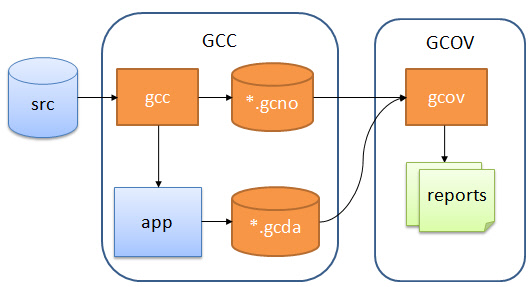
There are three main steps:
- Adding special compile options to the GCC compilation to generate the executable, and
*.gcno. - Running (testing) the generated executable, which generates the
*.gcdadata file. - With
*.gcnoand*.gcda, generate thegcovfile from the source code, and finally generate the code coverage report.
Here’s how each of these steps is done exactly.
Getting started
You can clone this repository and run make help to see how to use it.
$ git clone https://github.com/shenxianpeng/gcov-example.git
$ cd gcov-example

$ make help
help                           Makefile help
build                          Make build
coverage                       Run code coverage
lcov-report                    Generate lcov report
gcovr-report                   Generate gcovr report
deps                           Install dependencies
clean                          Clean all generate files
lint                           Lint code with clang-format
Steps to generate code coverage reports
# 1. compile
make build

# 2. run executable
./main

# 3. run code coverage
make coverage

# 4. generate report
# support lcov and gcovr reports
# to make report need to install dependencies first
make deps
# then
make lcov-report
# or
make gcovr-report
Advanced: Merging coverage from multiple build configurations
Real-world projects often compile the same source with different macros (feature flags, platform switches, etc.). You can combine the coverage from multiple configurations into a single report.
trigger.c demonstrates this with #ifdef TRIGGER_ON / #ifdef TRIGGER_OFF conditional branches:
# Build and run both configurations, then merge into one report
make coverage-merged
# => merged-report/index.html
Under the hood, this uses lcov --add-tracefile to merge two separate .info files:
lcov -a config1.info -a config2.info -o merged.info
genhtml merged.info --output-directory merged-report
Advanced: File-specific coverage filtering
To see coverage for a single file (e.g. trigger.c) rather than the whole project:
# First generate the full lcov report, then filter to trigger.c only
make coverage-filter
# => trigger-report/index.html
Using lcov --extract directly:
lcov --extract lcov-report/coverage.info "$(pwd)/trigger.c" -o trigger_only.info
genhtml trigger_only.info --output-directory trigger-report
With gcovr, use --filter:
gcovr --filter trigger.c --html --html-details -o trigger-report/coverage.html