This article shares practical experience with C/C++ code formatting and static analysis.
Currently, the most widely used tools for C/C++ code formatting and checking are Clang-Format and Clang-Tidy from the LLVM project.
The LLVM project is a collection of modular and reusable compiler and toolchain technologies.
For C/C++ code formatting and static analysis, we use clang-format and clang-tidy from the LLVM project; together, we call them clang-tools.
Although we have the tools, how to better integrate the tools into our workflow is the focus of this article.
The cpp-linter organization was created to provide a one-stop workflow for C/C++ code formatting and static analysis, including:
- Easy download of clang-tools, providing both Docker images and binaries;
- Easy integration with workflows, including integration with CI and git hooks.
Below is how to use clang-tools, download tools, and integrate them into your workflow.
clang-tools Docker images#
If you want to use clang-format and clang-tidy via Docker, the clang-tools project provides Docker images specifically for this purpose.
Just download the clang-tools Docker image, and you can use clang-format and clang-tidy. For example:
# Check clang-format version
$ docker run xianpengshen/clang-tools:12 clang-format --version
Ubuntu clang-format version 12.0.0-3ubuntu1~20.04.4

# Format code (helloworld.c is in the demo directory of the repository)
$ docker run -v $PWD:/src xianpengshen/clang-tools:12 clang-format --dry-run -i helloworld.c

# Check clang-tidy version
$ docker run xianpengshen/clang-tools:12 clang-tidy --version
LLVM (http://llvm.org/):
  LLVM version 12.0.0

  Optimized build.
  Default target: x86_64-pc-linux-gnu
  Host CPU: cascadelake
# Diagnose code (helloworld.c is in the demo directory of the repository)
$ docker run -v $PWD:/src xianpengshen/clang-tools:12 clang-tidy helloworld.c \
-checks=boost-*,bugprone-*,performance-*,readability-*,portability-*,modernize-*,clang-analyzer-cplusplus-*,clang-analyzer-*,cppcoreguidelines-*
clang-tools binaries#
If you need to use clang-tools binaries, taking Windows as an example, downloading a specific version of clang-tools usually requires installing the large LLVM package first to obtain tools like clang-format & clang-tidy; it’s much easier on Linux, where you can use commands to download, but downloading specific versions of clang-format & clang-tidy might require manual download and installation.
clang-tools-pip provides and supports downloading any specified version of clang-tools executables on Windows, Linux, and macOS via the command line.
Simply install clang-tools using pip (i.e., pip install clang-tools), and then you can install any version of the executable using the clang-tools command.
For example, to install clang-tools version 13:
$ clang-tools --install 13
You can also install it to a specific directory:
$ clang-tools --install 13 --directory .
After successful installation, you can check the installed version:
$ clang-format-13 --version
clang-format version 13.0.0

$ clang-tidy-13 --version
LLVM (http://llvm.org/):
  LLVM version 13.0.0
  Optimized build.
  Default target: x86_64-unknown-linux-gnu
  Host CPU: skylake
The clang-tools CLI also provides other options, such as automatically creating links for you. Check its CLI documentation for help.
Integrating clang-tools into your workflow#
We’ve introduced two convenient ways to download clang-tools: Docker images and binaries. How to integrate them into your workflow is our ultimate concern.
Mainstream IDEs can use clang-format and clang-tidy via plugins, but this has problems:
- Different developers may use different IDEs, requiring a high learning cost to install plugins on different IDEs;
- It cannot guarantee that all developers will run Clang-Format or Clang-Tidy when submitting code.
So how can we ensure that Clang-Format or Clang-Tidy is run every time code is submitted?
- cpp-linter-action provides CI checks. If unformatted code or diagnostic errors are found, the CI will fail, preventing code that hasn’t passed code checks from being merged into the main branch;
- cpp-linter-hooks uses git hooks to automatically run clang-format and clang-tidy when code is submitted. If the code doesn’t meet the standards, the submission fails, and a prompt appears with automatic formatting.
cpp-linter-action for Automatic Checks Before Code Merge#
If you’re using GitHub, we highly recommend using the cpp-linter-action GitHub Action.
Currently, cpp-linter does not have API integration with SCMs other than GitHub.
Here are some of its key features:
- Results are displayed using Annotations and Thread Comments.
- Supports GitHub’s public and private repositories.
- Supports most Clang versions.
- Many other optional-inputs are available.
To use this Action, simply create a cpp-linter.yml file under .github/workflows/, with the following content:
Of course, you can also add the following configuration to an existing Workflow, such as build.
name: cpp-linter

on:
  pull_request:
    types: [opened, reopened]
  push:

jobs:
  cpp-linter:
    runs-on: ubuntu-latest
    steps:
      - uses: actions/checkout@v3
      - uses: cpp-linter-action@v1
        id: linter
        env:
          GITHUB_TOKEN: ${{ secrets.GITHUB_TOKEN }}
        with:
          style: file

      - name: Fail fast?!
        if: steps.linter.outputs.checks-failed > 0
        run: |
          echo "Some files failed the linting checks!"
          exit 1
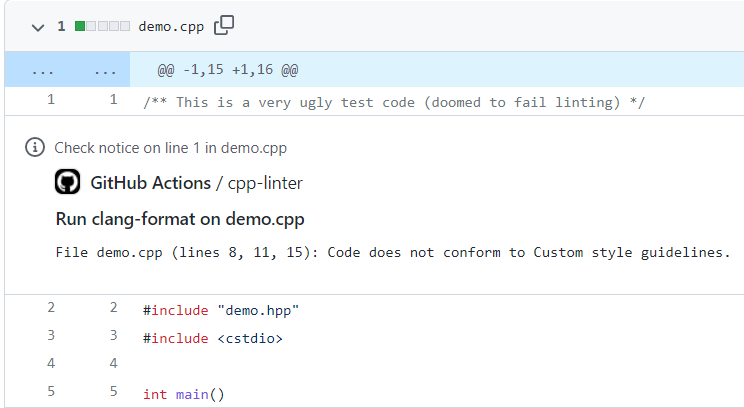
If unformatted code or static code analysis errors are found, the CI workflow will fail, and the following comments will appear; annotations are enabled by default.
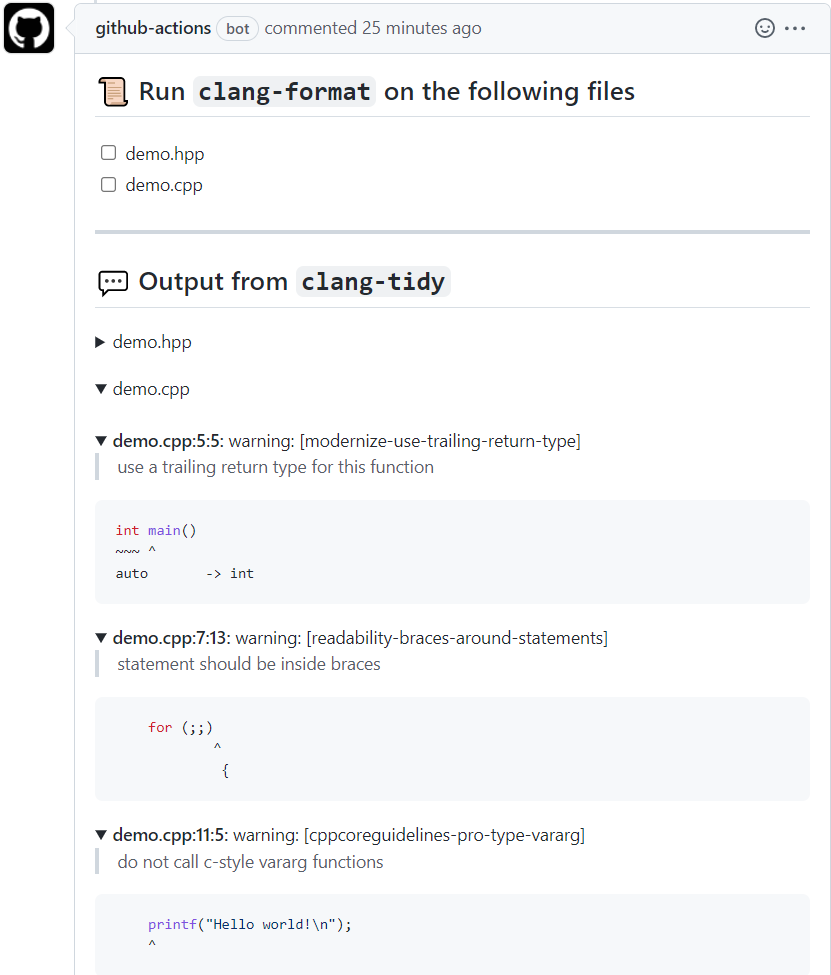
If the Thread Comment option (thread-comments: true) is enabled, the following error comments will be automatically added to the Pull Request.
Many well-known projects already depend on this Action, and its ranking in the GitHub Marketplace is very high; you can use it with confidence.
Note: The annotations and comment features currently only support GitHub. This project plans to support other SCMs like Bitbucket and GitLab in the future.
cpp-linter-hooks for Automatic Checks on Code Submission#
cpp-linter-hooks uses git hooks for automatic checks on code submission; this method is not limited to any SCM.
Just add a .pre-commit-config.yaml configuration file to your project repository, then add the cpp-linter-hooks hook to .pre-commit-config.yaml, as follows:
.pre-commit-config.yamlis the default configuration file for thepre-commitframework.
Install pre-commit
pip install pre-commitCreate the
.pre-commit-config.yamlconfiguration file, setting it as follows:repos: - repo: https://github.com/cpp-linter-hooks rev: v0.2.1 hooks: - id: clang-format args: [--style=file] # to load .clang-format - id: clang-tidy args: [--checks=.clang-tidy] # path/to/.clang-tidyHere,
filerefers to.clang-format. clang-format supports LLVM, GNU, Google, Chromium, Microsoft, Mozilla, and WebKit encoding formats by default. If you need special settings, you can create a.clang-formatconfiguration file in the root directory of your repository. Similarly, if the default static analysis settings do not meet your requirements, you can create a.clang-tidyconfiguration file in the root directory of the repository.For more configurations, see the README.
Install the git hook script
$ pre-commit install
pre-commit installed at .git/hooks/pre-commit
After this, every
git commitwill automatically run clang-format and clang-tidy.If unformatted code or static analysis errors are detected, the following error message will appear:
clang-format output
clang-format.............................................................Failed
- hook id: clang-format
- files were modified by this hook
And it will automatically format your code:
--- a/testing/main.c
+++ b/testing/main.c
@@ -1,3 +1,6 @@
#include <stdio.h>
-int main() {for (;;) break; printf("Hello world!\n");return 0;}
-
+int main() {
+  for (;;) break;
+  printf("Hello world!\n");
+  return 0;
+}
clang-tidy output
clang-tidy...............................................................Failed
- hook id: clang-tidy
- exit code: 1

418 warnings and 1 error generated.
Error while processing /home/ubuntu/cpp-linter-hooks/testing/main.c.
Suppressed 417 warnings (417 in non-user code).
Use -header-filter=.* to display errors from all non-system headers. Use -system-headers to display errors from system headers as well.
Found compiler error(s).
/home/ubuntu/cpp-linter-hooks/testing/main.c:3:11: warning: statement should be inside braces [readability-braces-around-statements]
  for (;;) break;
          ^
          {
/usr/include/stdio.h:33:10: error: 'stddef.h' file not found [clang-diagnostic-error]
#include <stddef.h>
        ^~~~~~~~~~
Conclusion#
CI or git hooks?
- If your team is already using pre-commit, we recommend using git hooks. Just add cpp-linter-hooks.
- If you don’t want to introduce pre-commit, you can use CI for checking. Of course, you can also choose both.
The cpp-linter organization is an open-source project I created and maintained by Brendan Doherty and me as the primary contributors. We are developers who pursue code quality and strive to build the best software. I’ve spent a lot of my free time on it, but I’ve also learned a lot. I’ll share some interesting implementation methods later.
Currently, cpp-linter provides the best C/C++ Linter Action and clang-tools on GitHub. We welcome your use, and you can provide feedback on any suggestions or problems through Issues.