Backgroud#
When you are using a server account for CI/CD, if you want to make the server account avatar to looks professional on Jira update but the server account may not allowed to log to Jira, so you can not update the avatar though GUI, you could use Jira REST API to do this.
I assume you have an account called robot, here are the examples of how to update though REST API.
Example in Python#
import http.client

conn = http.client.HTTPSConnection("jira.your-company.com")

payload = "{\r\n\t\"id\": \"24880\",\r\n\t\"isSelected\": false,\r\n\t\"isSystemAvatar\": true,\r\n\t\"urls\": {\r\n\t\t\"16x16\": \"https://jira.your-company.com/secure/useravatar?size=xsmall&avatarId=24880\",\r\n\t\t\"24x24\": \"https://jira.your-company.com/secure/useravatar?size=small&avatarId=24880\",\r\n\t\t\"32x32\": \"https://jira.your-company.com/secure/useravatar?size=medium&avatarId=24880\",\r\n\t\t\"48x48\": \"https://jira.your-company.com/secure/useravatar?avatarId=24880\"}\r\n}"

headers = {
    'content-type': "application/json",
    'authorization': "Basic Ymx3bXY6SzhNcnk5ZGI=",
    'cache-control': "no-cache",
    'postman-token': "ecfc3260-9c9f-e80c-e3e8-d413f48dfbf4"
    }

conn.request("PUT", "/rest/api/latest/user/avatar?username=robot", payload, headers)

res = conn.getresponse()
data = res.read()

print(data.decode("utf-8"))
Example in Postman#
# URL and Method is PUT
https://jira.your-company.com/rest/api/latest/user/avatar?username=robot

# Authorization
# Type: Basic Auth
# Username: server-account-username
# Password: server-accoutn-password

# Body
{
	"id": "24880",
	"isSelected": false,
	"isSystemAvatar": true,
	"urls": {
		"16x16": "https://jira.your-company.com/secure/useravatar?size=xsmall&avatarId=24880",
		"24x24": "https://jira.your-company.com/secure/useravatar?size=small&avatarId=24880",
		"32x32": "https://jira.your-company.com/secure/useravatar?size=medium&avatarId=24880",
		"48x48": "https://jira.your-company.com/secure/useravatar?avatarId=24880"}
}
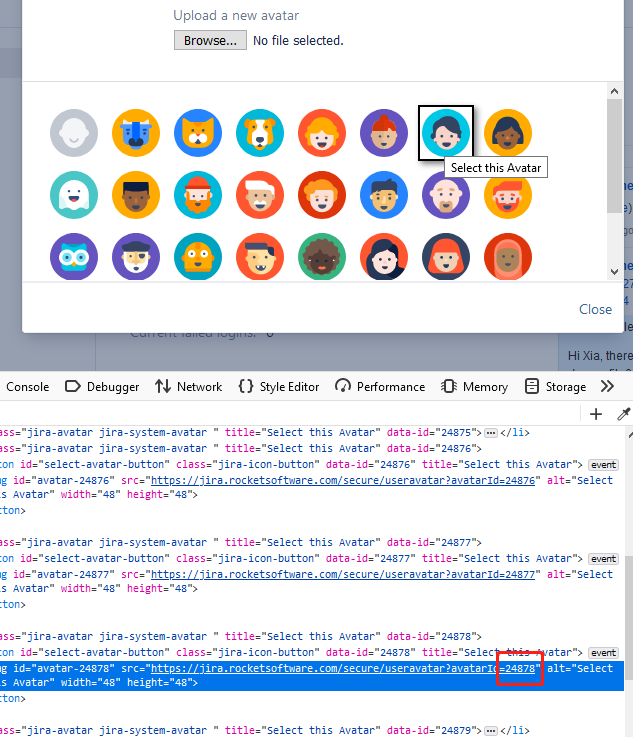
How to find the avatar id#
You replace other avatar ids you like. Here is how to find you avatar id you want